Can I play Watermelon Drop online?
Yes. You can play Watermelon Drop directly in your browser. Open the game page and click play to start without setting up an emulator first.
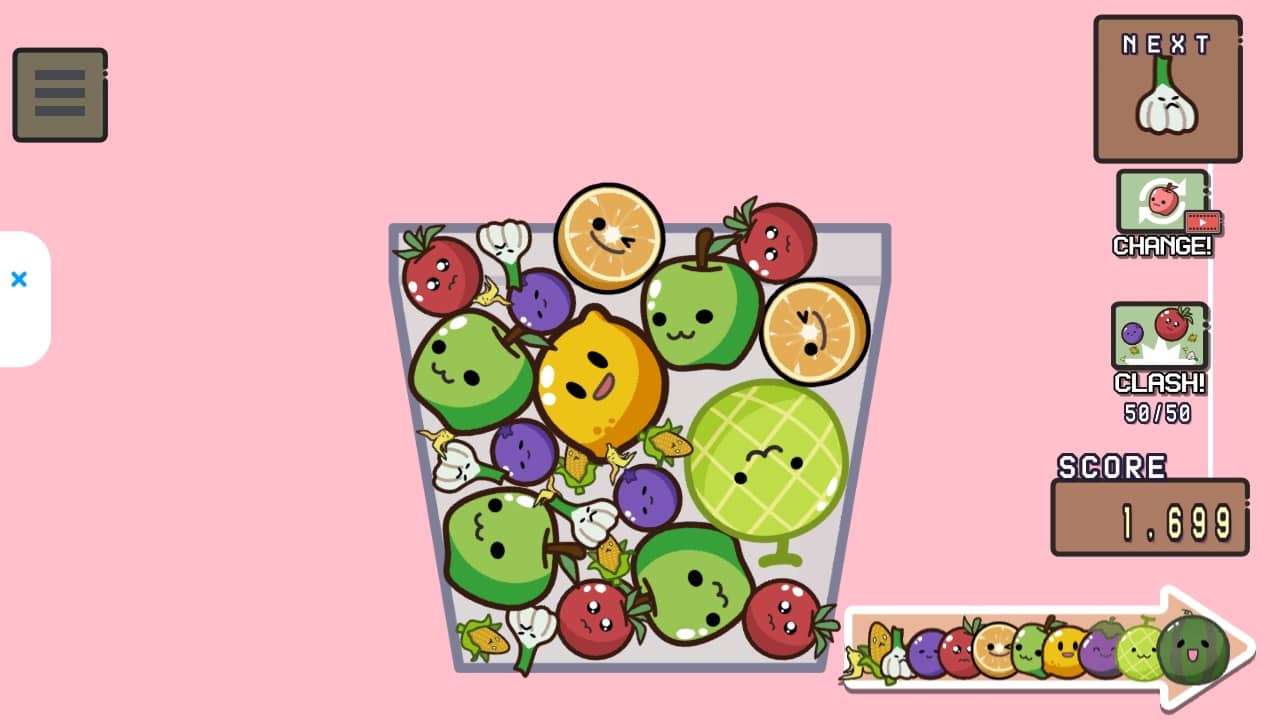
Watermelon Drop is a merge puzzle where you drop fruits and vegetables into a cup, combining identical items to create larger ones. It is simple to pick up and satisfying to watch your produce grow.
In Watermelon Drop, you drop various fruits and vegetables into a cup. When two of the same type touch, they merge into a bigger item. Your goal is to keep merging to create the largest produce possible without filling the cup too high. The game ends when the cup overflows. To play well, aim for merges that keep the pile low and stable. Drop pieces carefully so they land next to their matches, and avoid stacking too many different types in one area. Plan ahead: think about where each drop will settle and how it might set up future merges. New players should start by focusing on a few types at a time and clearing space near the top. Watermelon Drop is a straightforward HTML5 puzzle that fits the Suika-style merge genre. Its simple mouse controls and colorful produce make it easy to understand and play in short sessions. It is a good choice for players who enjoy casual, chain-reaction puzzles.
Yes. You can play Watermelon Drop directly in your browser. Open the game page and click play to start without setting up an emulator first.
No. Watermelon Drop is available as a no-download browser game, so you can start playing without installing extra software or downloading files.
Watermelon Drop is a HTML5 game in the Puzzle category. You can use the platform, genre, and related games sections to find similar titles.
Watermelon Drop usually works in modern browsers on desktop, tablet, and mobile devices. For the most stable gameplay experience, use Chrome or another mainstream browser.
Watermelon Drop is listed with developer information for yeqwep. You can also browse related games from the same developer or genre.